Back to Projects
Terminal AI Platform
2026

Forge-OSH

A terminal-first AI agent platform built for speed, control, and codebase-aware context.

4-layer architecture
Multi-provider routing
Session persistence
Overview

I built Forge-OSH as a modular Rust environment for AI-assisted terminal workflows, combining a polished TUI, provider routing, permissioned tools, and semantic code graph analysis.

Language DNA

Rust

Rust defines the feel of Forge-OSH. The product leans into low-latency terminal rendering, concurrency-heavy orchestration, and a systems-first design language that makes local tooling feel precise rather than improvised.

RustTokioRatatuiPetgraphRayon
Terminal-native architecture
1

Forge-OSH is structured as a provider-agnostic coding agent built entirely for the terminal, with no browser dependency and no vendor lock-in.

2

The runtime is built around Rust, Tokio, Ratatui, Crossterm, Reqwest, Serde, Petgraph, Rayon, and tiktoken-rs, which gives the platform both strong UX performance and systems-level control.

3

File I/O, shell execution, Git operations, search, web tooling, notebook support, worktrees, hooks, permissions, memory, and session management all live inside one coherent agent loop.

Core capabilities

Supports a wide provider mix including Anthropic, OpenAI, Gemini, Groq, OpenRouter, DeepSeek, xAI, and local Ollama-style backends.

Implements a true plan-execute-observe loop that can read files, write code, run shell commands, search, recover from errors, and continue until the task is finished.

Keeps strong safety boundaries through permission rules, blocked-command lists, trust modes, hooks, and scoped tool execution.

Developer ergonomics

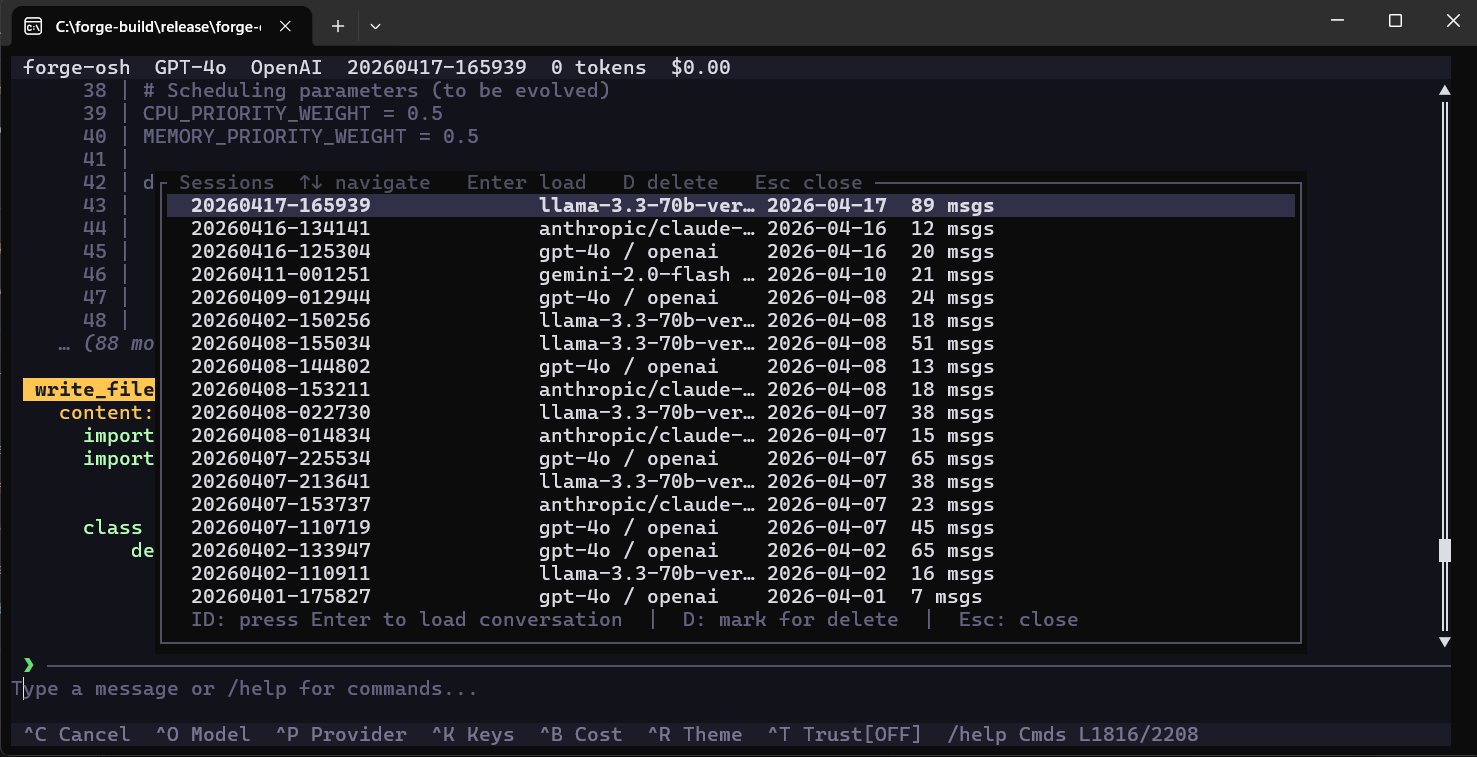
Ships a feature-rich TUI with themes, Vim mode, conversation history, modal pickers, slash commands, live cost tracking, and session export.

Adds undo-safe mutation, graph-based codebase awareness, auto-loaded project memory, and reusable skills for repeat workflows.

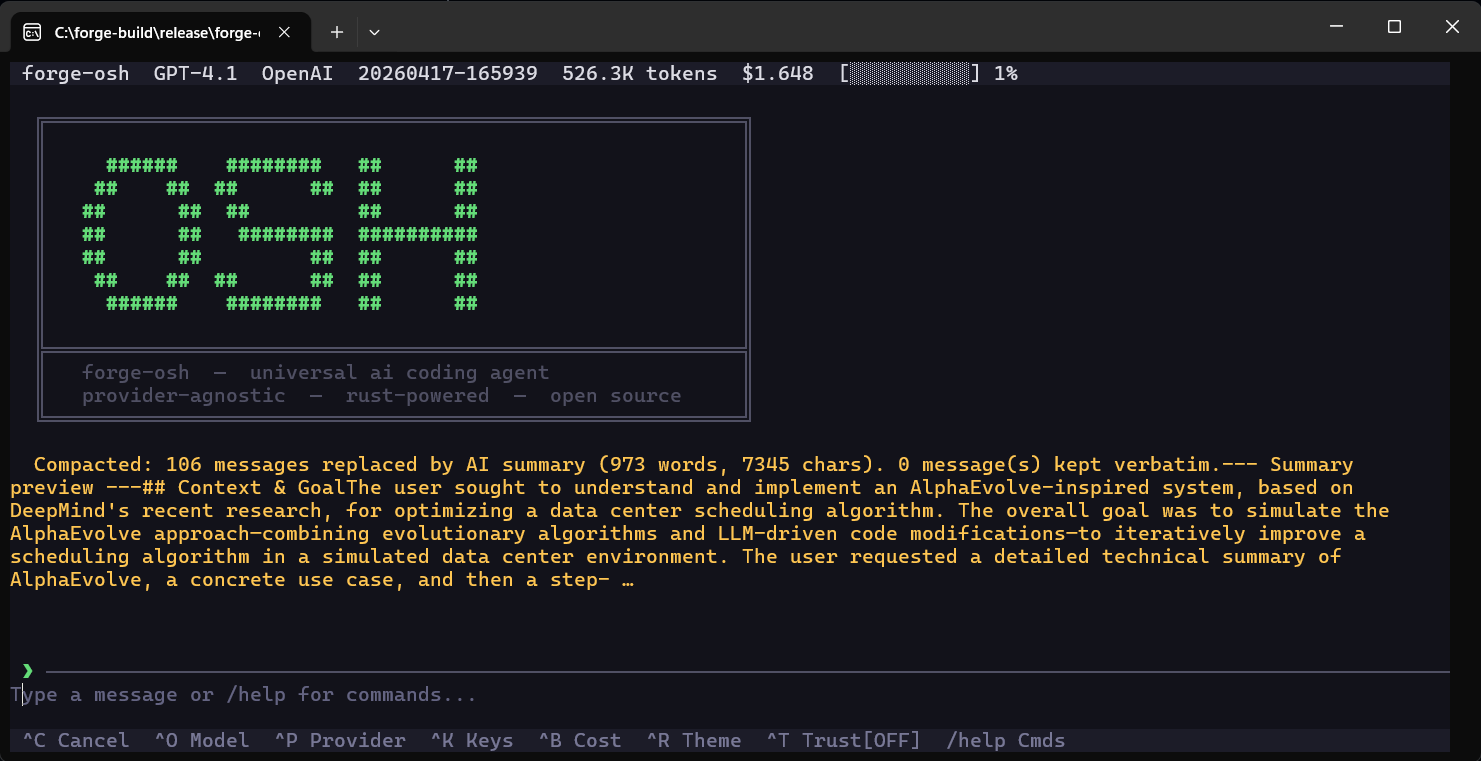
Treats context management as a product feature through token counting, compaction, session resume, and graph-assisted navigation.

System design

More than forty tools sit inside the runtime across file work, shell, Git, search, notebooks, worktrees, and quality workflows.

Code-graph support, hooks, undo, context compaction, and skills architecture are some of the strongest parts of the overall design.

Product capabilities

Layered the platform across TUI rendering, async orchestration, provider routing, and extensible tools.

Implemented semantic code graph analysis with Petgraph and Rayon for dependency-aware context packing.

Added secure key handling and file-history snapshots for persistence with undo support.

Workflow

How the product operates

1

Work begins entirely inside the terminal, with model selection, session setup, and conversation flow all staying local to the runtime.

2

The agent plans, uses tools inside permission boundaries, updates context, and stores state as the task evolves.

3

Sessions, hooks, memory files, and code-graph artifacts turn the environment into something persistently useful rather than one-off.

Execution model

The product goes unusually deep on tooling breadth, permissions, memory, code-graph navigation, hooks, compaction, and reusable skill workflows.

That combination makes it feel like a complete terminal platform rather than a thin chat wrapper around model calls.

Actions
Case study

What I focused on

Forge-OSH was designed as a terminal environment where the model is only one part of the experience. I focused on making command execution, file operations, context assembly, and session continuity feel deliberate and reliable, because those are the pieces that decide whether an agent is useful in day-to-day engineering work. The product direction was to keep the workflow local-first, fast to navigate, and controlled enough for real development rather than lightweight demos.

How it is structured

The architecture separates interface rendering, orchestration, provider abstraction, and tool execution into distinct layers so the platform can grow without becoming brittle. That separation makes it practical to add new providers, expand the tool surface, or change how context is managed without rewriting the whole runtime. It also keeps the user experience crisp, because the TUI, execution engine, and state management each have a clear responsibility.

Product documentation

Forge-OSH Open Source Harness

A universal, provider-agnostic coding agent for developers who live in the terminal.

v1.0.16MIT License
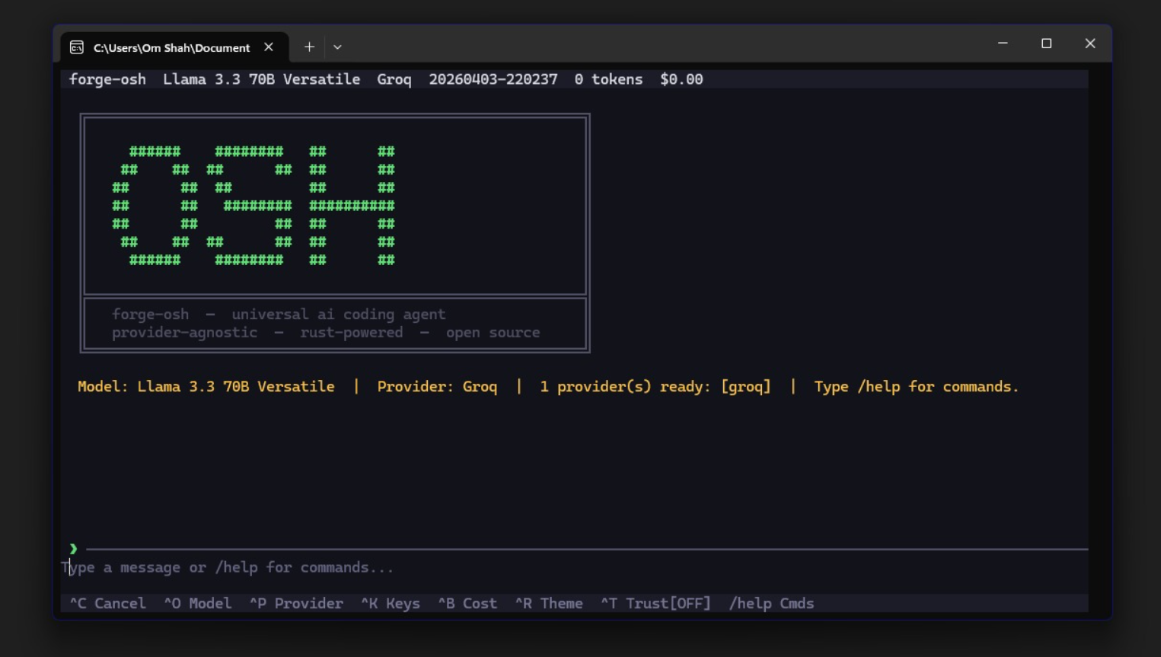
Forge-OSH interface screenshot 1
Forge-OSH interface screenshot 2
Forge-OSH interface screenshot 3
Forge-OSH interface screenshot 4
Forge-OSH interface screenshot 5
Forge-OSH interface screenshot 6
Forge-OSH interface screenshot 7
Forge-OSH interface screenshot 8
Forge-OSH interface screenshot 9
Vision

Project vision

Forge-OSH was created as a lightning-fast native AI coding assistant that runs entirely inside the terminal. It avoids Electron shells, browser tabs, and vendor lock-in, while still giving the agent enough autonomy to inspect code, modify files, run commands, manage Git, search, recover from errors, and continue through a real engineering task.

Use any LLM provider: Anthropic, OpenAI, Gemini, Groq, xAI, OpenRouter, DeepSeek, or local Ollama-style models.
Switch providers mid-conversation without rebuilding the workflow around a single vendor.
Run a true agentic loop that can read files, write code, run shell commands, manage Git, search the web, and fix its own failures.
Protect destructive work through permission rules, allow/deny globs, blocked command lists, and trust modes.
Ship as one compiled binary for Windows, macOS, and Linux with no Python, Node, Docker, or browser runtime required.
Snapshot

Key features at a glance

Feature overview

CategoryCapability
Providers12+ cloud providers, 6 local providers, and auto-detection for local inference servers.
Tools40+ tools across file I/O, shell execution, Git, search, web access, code quality, tasks, notebooks, and worktrees.
AgentAutonomous plan-execute-observe loop with explicit enter_plan_mode and exit_plan_mode control.
TUIFive color themes, Vim normal mode, mouse scrolling, conversation history, and modal pickers.
SafetyPer-tool permission rules with glob patterns, blocked command lists, and trust mode.
SessionsAuto-save, named sessions, resume, and Markdown export.
ContextLLM-based compaction, precise token counting, and real-time cost tracking.
UndoSnapshot-backed file undo for every agent mutation.
HooksShell hooks on PreToolUse, PostToolUse, Stop, Notification, UserPromptSubmit, SessionStart, SessionEnd, and PreCompact events.
MemoryAutomatic loading of CLAUDE.md files from project, parent, user, and Claude-compatible paths.
Code GraphSemantic code graph with deterministic symbol lookup and token-efficient codebase navigation.
Architecture

Tech stack and architecture

The system is structured around a Rust terminal UI, an application core, a provider router, a session and configuration layer, a tool registry, and an optional semantic graph engine. The core design keeps rendering, orchestration, provider routing, tools, permissions, hooks, context management, and graph navigation separated enough to grow independently.

Core stack

LayerTechnology
LanguageRust 2021 Edition
Async runtimeTokio with full features
Terminal UIRatatui and Crossterm
CLI parsingClap v4 with derive macros
HTTPReqwest with Rustls TLS and SSE streaming
Tokenizationtiktoken-rs for accurate token counting
SerializationSerde, JSON, TOML, and Bincode for graph artifacts
Code graphPetgraph StableGraph with Rayon parallel parsing
Code qualitySyntect for syntax highlighting and Similar for diff generation
Errorsthiserror typed errors and Anyhow
LoggingTracing with environment filtering

Architecture map

text
CLI/TUI -> App Core -> Provider Router

App Core owns:
- Agent loop
- Sessions and history
- Token accounting
- Configuration
- Keyring
- Model database
- Hooks
- Permissions

Tool Registry includes:
- File I/O
- Git operations
- Shell and PowerShell
- Search and web
- Code quality
- Task management
- Agent planning
- Notebooks
- Worktrees
- graph_query

Optional Semantic Code Graph includes:
- Petgraph StableGraph
- Two-pass parallel builder
- Bincode artifact persistence
- O(1) symbol lookup indices
Installation

Getting the application

Pre-built binary: request a compiled executable by emailing omamitshah@gmail.com with operating system and architecture.
GitHub Releases: download the platform archive from the forge-osh releases page and place the binary on PATH.
Source install: clone the repository and run cargo install --path . with Rust 1.75+.
Custom build: set CARGO_TARGET_DIR on Windows when needed, then run cargo build --release.

Release artifacts

PlatformFile
Windows x64forge-osh-windows-amd64.zip
macOS Apple Siliconforge-osh-macos-arm64.tar.gz
macOS Intelforge-osh-macos-amd64.tar.gz
Linux x64forge-osh-linux-x86_64.tar.gz

Install from source

bash
git clone https://github.com/OmShah74/forge-osh.git
cd forge-osh
cargo install --path .

Windows release build

powershell
$env:PATH = "$env:USERPROFILE\.cargo\bin;C:\msys64\mingw64\bin;$env:PATH"
$env:CARGO_TARGET_DIR = "C:\forge-build"
cargo build --release
Start

Quick start guide

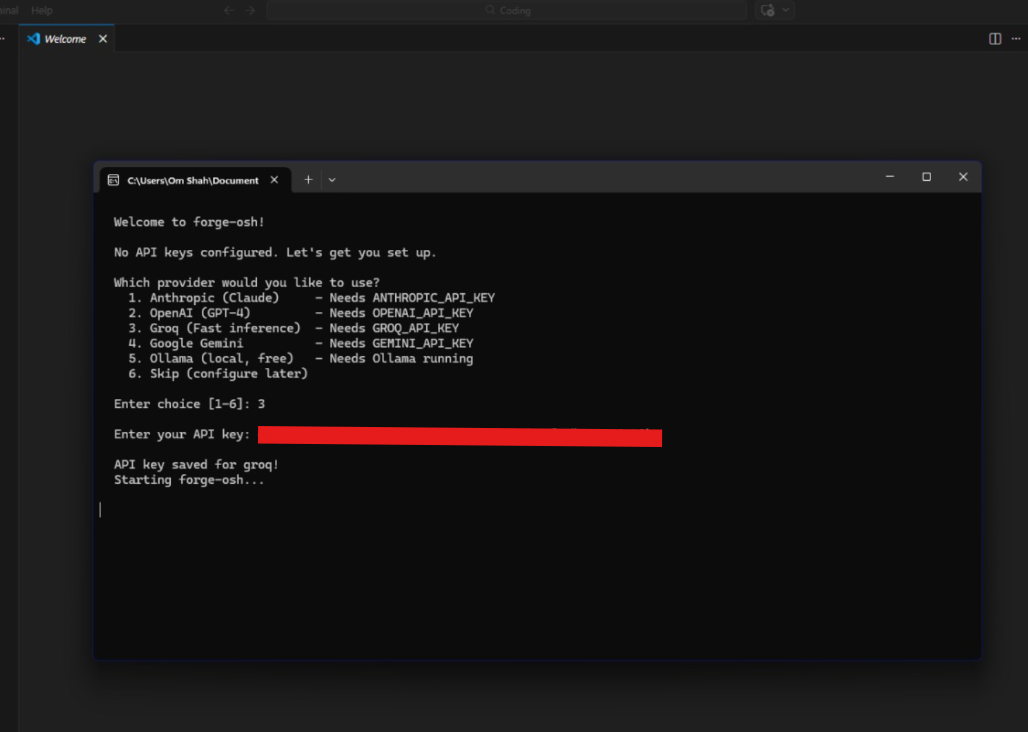
Run forge-osh with no arguments for the guided first-run setup.
Set API keys directly with forge-osh config keys set <provider> <key>.
Use environment variables for ephemeral API key sessions.
Launch interactive TUI mode with forge-osh.
Run a single task by passing the prompt as an argument.
Pipe logs, code, or errors through stdin for diagnosis workflows.
Specify provider and model for a single session with -p and -m.
Resume the last session with --resume or start a named session with --session.

Common launch commands

bash
forge-osh
forge-osh config keys set anthropic sk-ant-api-xxxxxxxxxxxx
export ANTHROPIC_API_KEY=sk-ant-api-xxxxxxxxxxxx
forge-osh "Fix the null pointer exception in src/handler.rs"
cat build_errors.log | forge-osh "Diagnose and fix these build errors"
forge-osh -p groq -m llama-3.3-70b-versatile "Refactor the auth module"
forge-osh --resume
forge-osh --session feature-auth-refactor
Models

Supported LLM providers

Forge-OSH is provider agnostic. It supports major cloud providers, multiple local inference servers, default model selection, local auto-detection, and provider switching inside an active workflow.

Cloud providers

ProviderEnvironment variableDefault model
AnthropicANTHROPIC_API_KEYclaude-sonnet-4-20250514
OpenAIOPENAI_API_KEYgpt-4o
Google GeminiGEMINI_API_KEYgemini-2.0-flash
GroqGROQ_API_KEYllama-3.3-70b-versatile
xAI GrokXAI_API_KEYgrok-3
OpenRouterOPENROUTER_API_KEYanthropic/claude-sonnet-4-20250514
MistralMISTRAL_API_KEYmistral-large-latest
DeepSeekDEEPSEEK_API_KEYdeepseek-chat
Together AITOGETHER_API_KEYmeta-llama/Llama-3.3-70B-Instruct-Turbo
FireworksFIREWORKS_API_KEYllama-v3p3-70b-instruct
PerplexityPERPLEXITY_API_KEYsonar-pro
CohereCOHERE_API_KEYcommand-r-plus

Local providers

ProviderDefault URLAuto-detect
Ollamahttp://localhost:11434Yes
LM Studiohttp://localhost:1234Yes
llama.cpphttp://localhost:8080Yes
vLLMhttp://localhost:8000Yes
Janhttp://localhost:1337Yes
LocalAIhttp://localhost:8080Yes
Tools

Agent tool suite

The tool suite gives the agent enough surface area to perform full engineering work while still allowing each operation to be permissioned, observed, and recovered.

File system operations

ToolPermissionDescription
read_fileReadOnlyRead file content with optional line ranges.
write_fileMutatingWrite an entire file, either new or overwrite.
edit_fileMutatingSurgical find-and-replace edits, preferred over write_file.
create_fileMutatingCreate a new file and error if it already exists.
delete_fileDestructiveDelete a file with confirmation.
list_directoryReadOnlyList directory contents.
move_fileMutatingMove or rename files.
copy_fileMutatingCopy files.

Shell execution

ToolPermissionDescription
bashVariesRun shell commands. Read-only commands such as ls, cat, grep, and git log are auto-allowed.
powershellVariesRun PowerShell commands on Windows. Get-* cmdlets are auto-allowed.

Git operations

ToolPermissionDescription
git_statusReadOnlyWorking tree status.
git_diffReadOnlyDiff with staged and file-specific options.
git_logReadOnlyCommit history with formatting.
git_blameReadOnlyLine-by-line blame.
git_showReadOnlyShow commit contents.
git_addMutatingStage files.
git_commitMutatingCreate commits.
git_branchMutatingCreate and list branches.
git_checkoutMutatingSwitch branches.
git_stashMutatingStash changes.
git_resetDestructiveReset HEAD.
git_fetchNetworkFetch from remotes.
git_pushNetworkPush to remotes.
git_pullNetworkPull from remotes.

Search, web, quality, tasks, orchestration, notebooks, worktrees, and graph

AreaTools
Searchsearch_files, find_files
Webweb_fetch, web_search
Code qualityrun_linter, run_tests, run_formatter
Taskstodo_write, task_create, task_update, task_get, task_list
Agent orchestrationask_user, enter_plan_mode, exit_plan_mode
Notebooksnotebook_read
Git worktreesenter_worktree, exit_worktree, list_worktrees
Semantic code graphgraph_query with find, context_pack, blast_radius, file_graph, mutations, and stats
Runtime

Agentic loop and TUI

The agent follows an understand, plan, execute, observe, and report loop.
Complex prompts can trigger plan mode before edits or command execution.
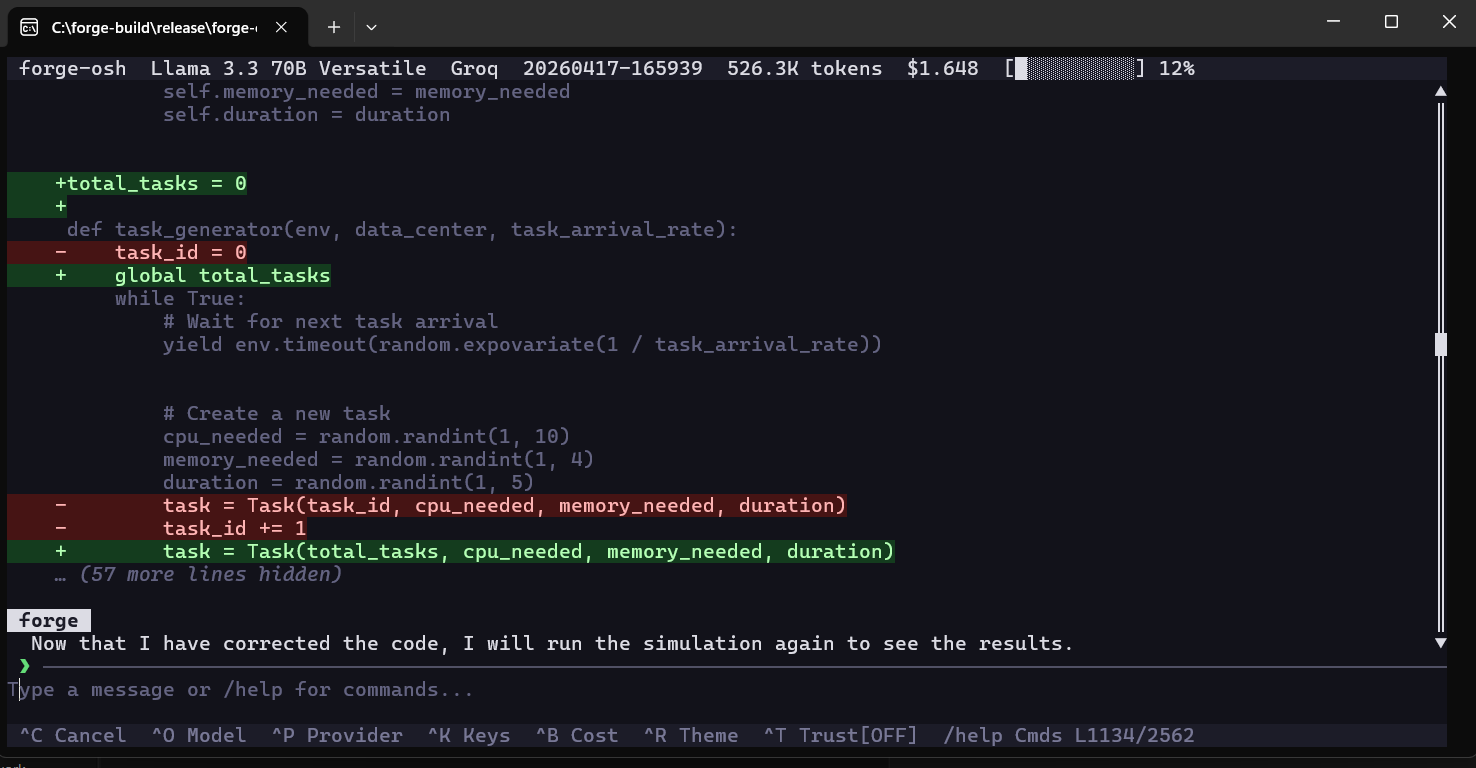
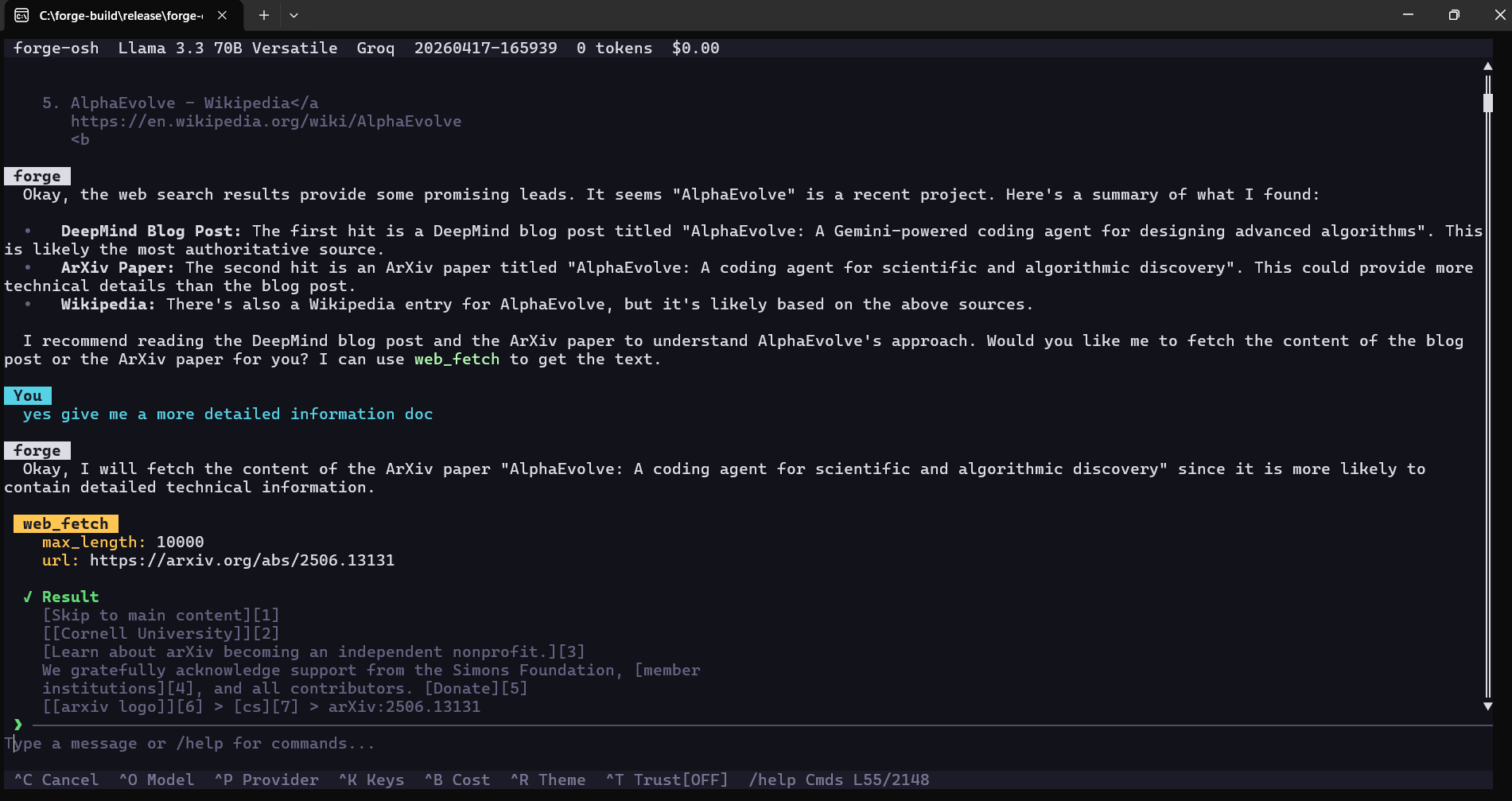
The full-screen TUI includes a header bar, conversation view, input box, and status bar.
The header displays model, provider, session name, token count, cost, theme, and trust status.
Conversation history is scrollable and syntax-highlighted.
Vim normal mode supports j/k scrolling, half-page movement, top/bottom jumps, and insert-mode return.
Themes include dark, light, dracula, nord, and solarized.
Commands

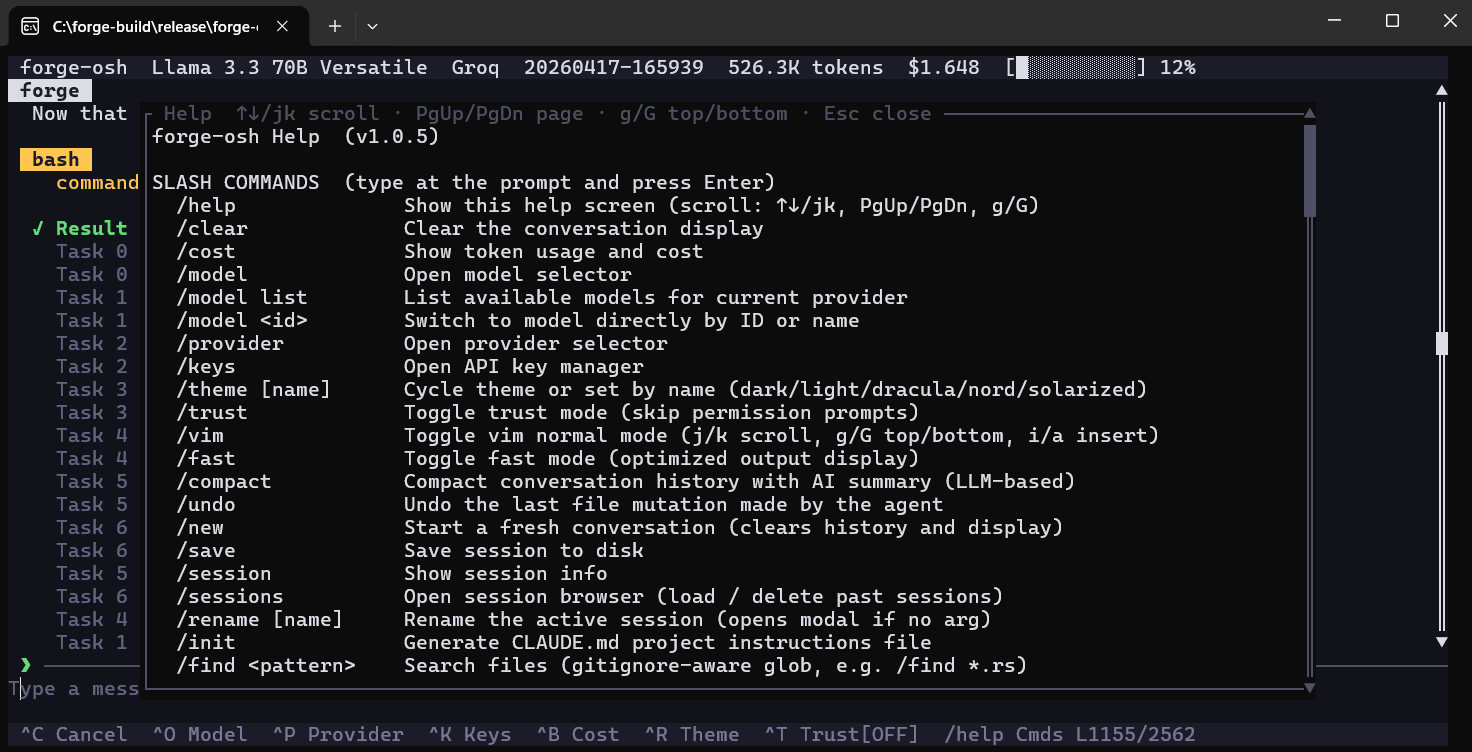
Slash commands and keyboard shortcuts

General commands

CommandDescription
/helpShow full help overlay.
/clearClear the conversation display.
/quit, /exitExit forge-osh.
/newStart a fresh conversation.
/saveSave session to disk.
/sessionShow current session info.

Model, provider, and control commands

CommandDescription
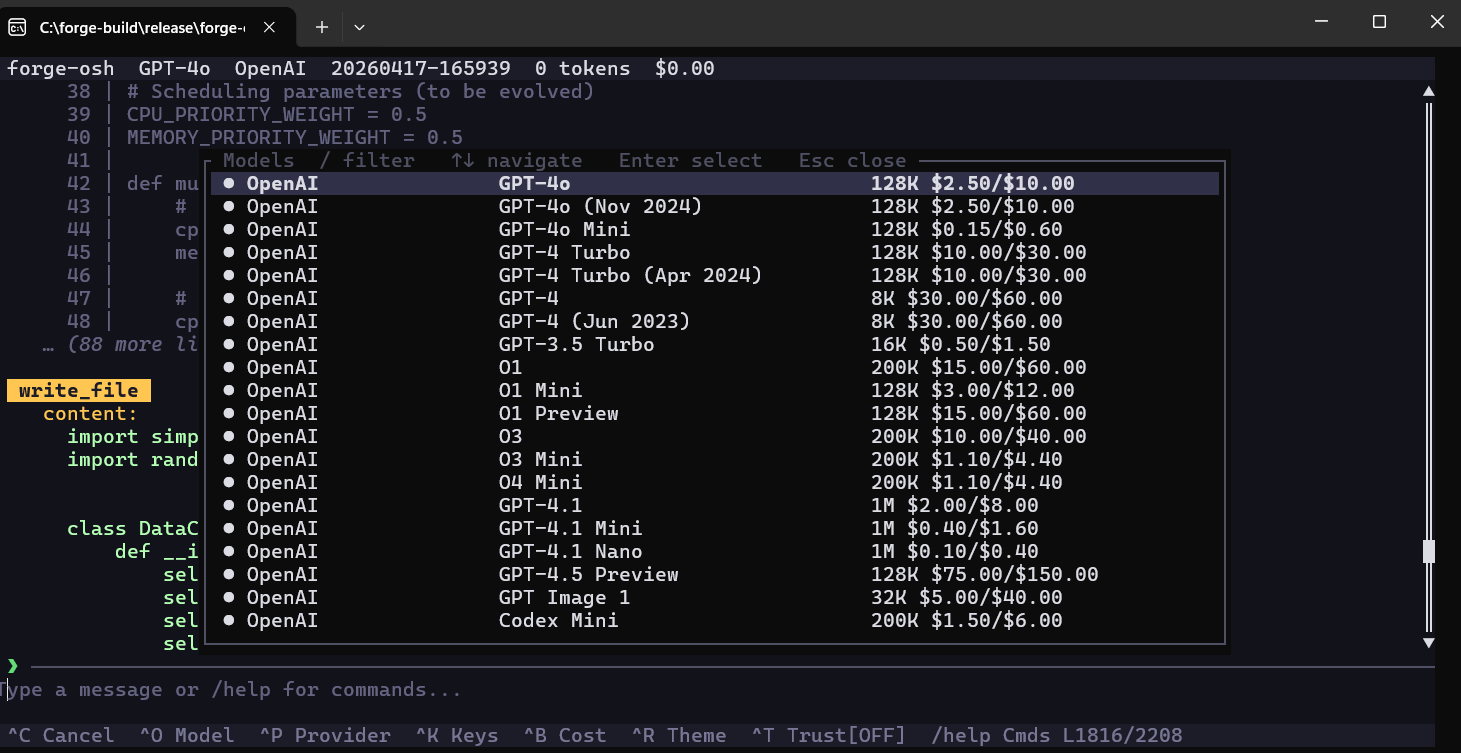
/modelOpen model selector picker.
/model listList available models for the current provider.
/model <id>Switch directly to a model by ID.
/providerOpen provider selector picker.
/keysOpen the API key manager.
/trustToggle trust mode.
/vimToggle Vim normal mode.
/fastToggle fast mode.
/compactRun LLM-based context compaction.
/undoUndo the last agent file mutation.
/effort <1-5>Set response effort level.
/copyCopy last assistant response to clipboard.
/permissionsView or edit permission rules.

Git, export, diagnostics, and graph commands

CommandDescription
/commitGenerate an AI commit message for staged changes.
/diff [staged]Show git diff statistics.
/export [file.md]Export conversation to Markdown.
/costShow token usage and cost breakdown.
/statusShow provider, model, context percentage, and cost.
/doctorRun environment diagnostics.
/resumeList saved sessions for resuming.
/forge-graphBuild and save a semantic code graph artifact.
/forge-graph rebuildForce a full graph rebuild.
/forge-graph statusShow node count, edge count, build time, and file count.
/forge-graph query <name>Search the graph for a symbol by name.
/forge-graph clearRemove artifact and unload graph.

Keyboard shortcuts

ShortcutAction
Ctrl+CCancel or interrupt the active agent turn.
Ctrl+DExit on empty input.
Ctrl+LClear conversation.
EscClose modal or enter Vim mode.
EnterSubmit prompt.
Shift+EnterInsert newline.
Ctrl+A / Ctrl+EMove cursor to start or end.
Ctrl+U / Ctrl+WDelete to start of line or previous word.
Ctrl+O / Ctrl+P / Ctrl+KOpen model picker, provider picker, or API key manager.
Ctrl+BShow token and cost info.
Ctrl+RCycle color theme.
Ctrl+TToggle trust mode.
Ctrl+S / Ctrl+N / Ctrl+XSave session, create new session, or export session.
PgUp / PgDn / Mouse WheelScroll conversation.
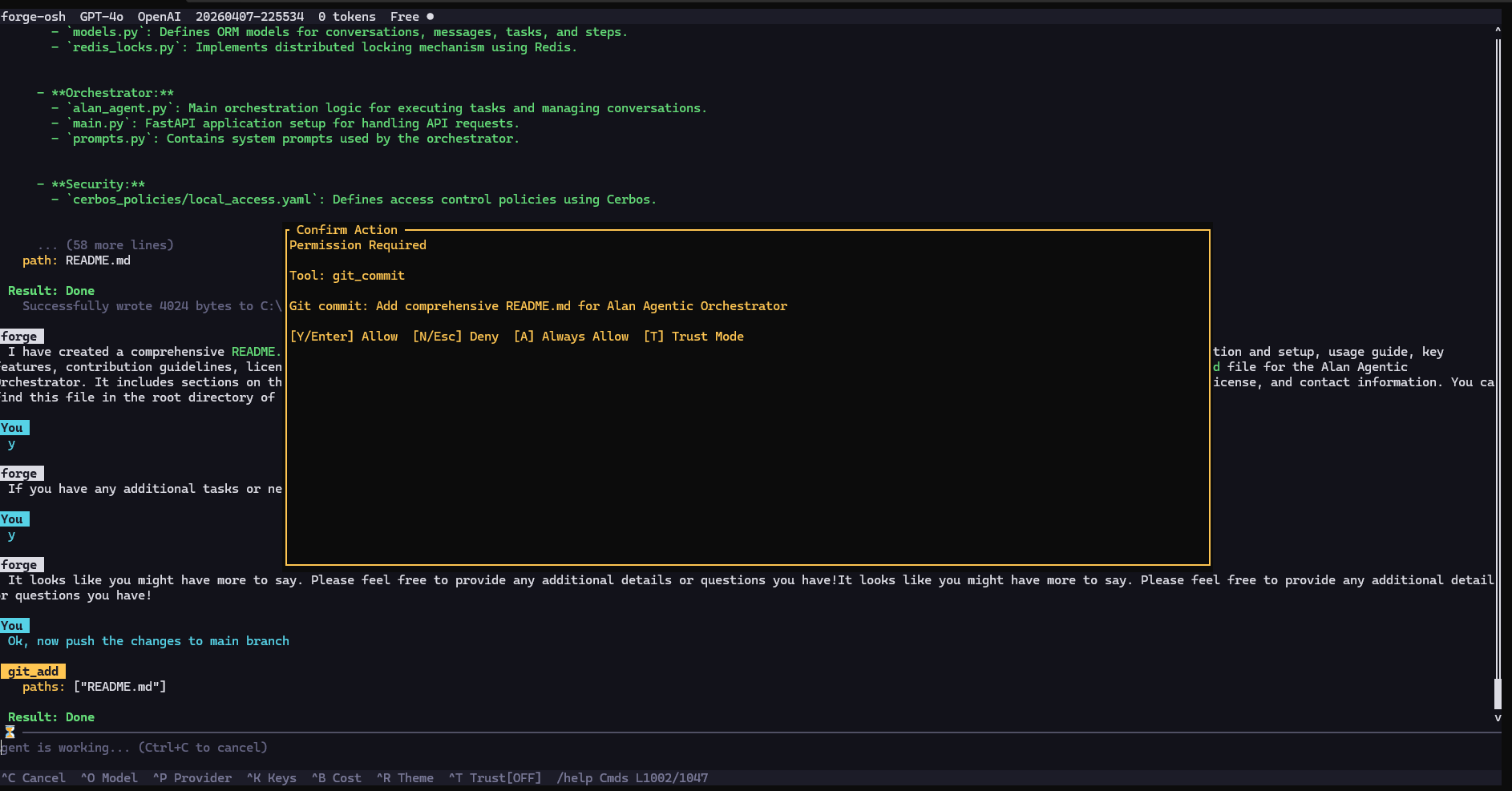
Y / N / A / TAllow, deny, always allow, or enable trust mode in confirmation dialogs.
Safety

Permissions, hooks, memory, sessions, context, and undo

Permission rules live in ~/.forge-osh/permissions.json and use wildcard patterns such as bash(git *) or edit_file(/src/*).
Deny rules are checked first, allow rules second, then the user is prompted when no rule matches.
ReadOnly tools never prompt, and trust mode bypasses prompts.
Hooks are configured in ~/.forge-osh/hooks.json and can run before tools, after tools, at stop events, notifications, prompt submission, session start/end, and pre-compaction.
Hook commands receive TOOL_NAME, TOOL_INPUT, TOOL_OUTPUT, and IS_ERROR environment variables where relevant.
CLAUDE.md memory files are loaded from project scope, user scope, Claude-compatible directories, and parent directories.
Sessions auto-save to ~/.local/share/forge-osh/sessions/ with provider, model, message history, timestamps, and token usage.
Context compaction replaces older messages with dense summaries that preserve files touched, decisions, task state, errors, IDs, branch names, and next steps.
Every write_file, edit_file, create_file, and delete_file call snapshots the previous state so /undo can restore or delete the affected file.
Permission examples

text
/permissions add bash(git *)
/permissions add bash(cargo *)
/permissions add read_file(*)
/permissions add edit_file(/src/*)
/permissions deny bash(rm -rf *)
/permissions remove <index>

Hook configuration

json
{
  "PreToolUse": [
    { "matcher": "bash", "command": "echo 'Running: $TOOL_INPUT'" }
  ],
  "PostToolUse": [
    { "matcher": "*", "command": "echo 'Tool $TOOL_NAME done (error=$IS_ERROR)'" }
  ],
  "Stop": [
    { "command": "notify-send 'forge-osh task complete'" }
  ]
}
Graph

Semantic code graph

The optional forge-graph engine builds a semantic graph artifact for deterministic symbol lookup, dependency tracing, blast-radius analysis, file-level graph views, mutation tracking, and token-budgeted context packs.

The graph is built with a two-pass process: parallel source parsing first, then sequential node insertion and edge resolution.
Three in-memory indices power lookup: fully-qualified symbol index, file index, and name index.
Artifacts are serialized with Bincode as forge_graph_<dirname>.bin and reloaded automatically on launch.
The graph is optional; if no artifact exists, Forge-OSH behaves like earlier versions.

Supported languages

LanguageDefinitions parsedImportsCall graph
Rustfn, struct, enum, trait, impl, macro_rules!, mod, type, static, constuse statementsFunction and method calls
Pythondef, class, async defimport and from ... importFunction calls
JavaScript / TypeScriptfunction, class, const/let/var arrows, interface, type, enumimport and require()Function calls
Gofunc, type struct, type interface, var, constimport blocksFunction calls

Node and edge types

KindValues
Node kindsFile, Module, Class, Struct, Enum, EnumVariant, Function, Method, Trait, Interface, Impl, GlobalVar, TypeAlias, Macro, Field, ExternalStub
Edge typesContains, Defines, Calls, Instantiates, Returns, ReadsState, MutatesState, Implements, Inherits, Imports, ExternalDependency

graph_query operations

json
{ "operation": "find", "target": "MyStruct" }
{ "operation": "context_pack", "target": "src/agent/loop.rs::AgentLoop::run", "token_budget": 4000 }
{ "operation": "blast_radius", "target": "src/graph/types.rs::GraphNode" }
{ "operation": "file_graph", "target": "src/tui/mod.rs" }
{ "operation": "mutations", "target": "scroll_top" }
{ "operation": "stats" }
Swarm

Multithread swarm architecture

Versions 1.0.10 through 1.0.13 introduced context preservation, better default model routing, graceful execution management, and an opt-in multithreaded swarm architecture inspired by enterprise agent harnesses.

The default mode remains the stable serial monolithic loop.
Swarm mode is opt-in through /multithread or /mt.
Prompts prefixed with @worker spawn parallel background agents.
Each worker has isolated memory, independent conversation history, independent context windows, and Trust Mode authorization through the coordinator.
The coordinator reports worker spawn, tool signals, completion, token usage, and failures back into the main TUI.
/multithread status lists running workers with IDs and task descriptions.
/multithread stop aborts all background workers.

Worker prompts

text
@worker Deep dive into the Albot Video RAG ingestion pipeline and document the extraction logic.
@worker Find out why the Windows build is complaining about missing MSYS2 dependencies.
@worker Write a python script to parse the nginx error logs in the /scratch directory.
Hardening

v1.0.15 architecture and skills overhaul

Version 1.0.15 is the largest hardening pass in Forge-OSH. It replaces earlier assumptions with permission modes, extended thinking, schema validation, cancellation tokens, concurrency-safe tools, a file-state cache, precise token counting, structured compaction, expanded hooks, a failure circuit breaker, fuzzy resume, and a full Skills subsystem.

Permission modes

ModeEffect
DefaultReadOnly tools auto-allow; other actions prompt or follow persistent permission rules.
PlanReadOnly tools only; mutating, shell, network, and destructive tools are denied.
AcceptEditsFile mutations auto-approve; destructive, shell, and network tools still prompt.
BypassAll tools auto-approve, matching legacy trust mode.

Core hardening upgrades

UpgradeBehavior
Extended thinkingAnthropic thinking budget can be toggled with /think or /think <tokens>.
Tool executor rewriteCancellation, JSON schema validation, permission evaluation, permission decisioning, and tracing happen before execution.
JSON schema validationInvalid tool inputs are rejected before touching disk or shell state.
Cancellation tokensCtrl+C cancels in-flight provider streams, tools, and backoff sleeps while preserving the app session.
Tool concurrencyRead-only and safe tools can execute in parallel while preserving result order.
File-state cacheSHA-256 fingerprints detect external edits before write/edit operations.
Tiktoken countingcl100k_base token counts replace rough chars/4 estimates.
Compaction rewriteStructured summaries preserve files, decisions, commands, errors, identifiers, state, and next steps.
Expanded hooksLifecycle now includes UserPromptSubmit, SessionStart, SessionEnd, and PreCompact.
Failure circuit-breakerRepeated identical tool failures trigger a recovery instruction instead of looping forever.
Fuzzy resume--resume can load latest, exact ID, ID prefix, or session name.

Mode commands

text
/mode <plan|accept-edits|bypass|default>
/plan
/accept-edits
/bypass
/default
/think
/think 8000
Skills

Skills architecture and UX

Skills are reusable named workflows stored as SKILL.md files with YAML frontmatter. They can be discovered by the agent, invoked manually, scoped to allowed tools, run inline, or fork into isolated workers.

Skill sources are project, user, and bundled, with project skills taking highest precedence.
Project skills live in ./.claude/skills/<name>/SKILL.md.
User skills live in ~/.forge-osh/skills/<name>/SKILL.md.
Bundled skills are compiled into the binary and provide safe defaults.
Bundled skills include debug, review, refactor, and project-memory.
Inline skills inject the workflow into the current conversation and narrow tool access through a skill scope.
Forked skills run in an isolated worker and return a Skill Result message.
The system prompt can list skills so the LLM can invoke them through invoke_skill.
The status bar shows the active skill and clears when the turn ends or /skill off is used.
Tab completion supports skill names for /skill, /skill show, /skill edit, and /skill delete.

Skill sources

SourceLocationPrecedence
Project./.claude/skills/<name>/SKILL.mdHighest
User~/.forge-osh/skills/<name>/SKILL.mdMiddle
BundledCompiled into the binaryLowest

Skill commands

CommandDescription
/skillsList all skills grouped by source.
/skill <name> [args]Invoke a skill.
/skill show <name>Show frontmatter summary and full body.
/skill new <name>Scaffold a project skill and open editor.
/skill edit <name>Open an existing skill in editor.
/skill delete <name>Remove a project skill directory.
/skill reloadRe-scan all skill directories.
/skill pathPrint all skill search paths.
/skill offClear the active skill scope.

Skill configuration

toml
[agent]
skills_enabled = true
include_skills_in_system_prompt = true
max_skill_listed_in_prompt = 12
Reference

CLI, configuration, and environment reference

CLI command groups

GroupCommands
Configuration and keysconfig keys set/list/remove, config set/get
Models and providersproviders list/test, models list, models set
Sessionssessions list/export/delete, --session, --resume
Execution modessingle-task prompt, pipe mode, --trust, --no-tools, --verbose, --no-color, --theme

Environment variables

VariableDescription
FORGE_PROVIDEROverride default provider.
FORGE_MODELOverride default model.
FORGE_TRUSTSet to 1 for trust mode.
FORGE_THEMEOverride UI theme.
FORGE_NO_COLORDisable all colors.
FORGE_CONFIG_DIROverride config directory.
FORGE_DATA_DIROverride data directory.
ANTHROPIC_API_KEYAnthropic API key.
OPENAI_API_KEYOpenAI API key.
GEMINI_API_KEYGoogle Gemini API key.
GROQ_API_KEYGroq API key.
XAI_API_KEYxAI API key.
OPENROUTER_API_KEYOpenRouter API key.
MISTRAL_API_KEYMistral API key.
DEEPSEEK_API_KEYDeepSeek API key.
TOGETHER_API_KEYTogether AI API key.
FIREWORKS_API_KEYFireworks API key.
PERPLEXITY_API_KEYPerplexity API key.
COHERE_API_KEYCohere API key.

Configuration defaults

toml
[general]
theme = "dark"
default_provider = "anthropic"
trust_mode = false
auto_save_sessions = true
max_session_history = 100
verbose = false
system_prompt_extra = ""

[agent]
max_tokens = 8192
temperature = 0.7
max_tool_iterations = 50
planning_mode = true
auto_summarize_at = 0.8
max_output_per_tool = 50000

[tools.bash]
timeout_seconds = 30
max_timeout_seconds = 300
blocked_commands = ["rm -rf /", "sudo rm -rf /", "mkfs", ":(){:|:&};:"]

[tools.web]
enabled = true
timeout_seconds = 15
max_content_length = 50000

[ui]
show_token_count = true
show_cost = true
show_spinner = true
syntax_highlight = true
diff_before_apply = true
compact_tool_output = true
max_conversation_lines = 1000
Roadmap

Future roadmap, contribution, and contact

Advanced code generation with AST-aware modifications, unified diff previews, and multi-file edit transactions.
Token usage optimization through shipped semantic graph context packing, future prompt caching, and stronger summarization.
Intelligent checkpoint structure with local state-machine checkpointing, timeline branching, and visual rollback.
Next-generation TUI improvements such as split panes, file previews, floating modals, minimaps, and richer visualization.
Future integrations for VS Code, Cursor, Antigravity, desktop companion workflows, and REST API server mode.
Contributions should start with an issue for large changes, then run cargo fmt, cargo clippy, and cargo test before submission.
Forge-OSH is MIT licensed and maintained by Om Shah.